
The observant among you will have noticed that NewZapp has had a new layout change, but what has actually changed in NewZapp now?
The Left Navigation Menu
We'll start with the most obvious change. Previously the tabs for the different sections of NewZapp were at the top of the screen and they've now moved to the left hand side.
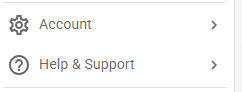
We've also moved the sections under your profile menu (that you could previously access by clicking your initials in the top right corner of the screen), that give you details about your account, to this side menu as well.
Minimising the menu
A lot fo our customers use NewZapp on laptops and given that they have smaller screens than a desktop we've now added the option to hide this menu, so that those users have more screen available to them for the generation of comms.
To hide the menu all you need to do is click this icon in the top left of your screen.

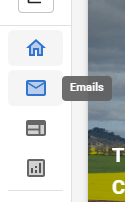
This will reduce the menu to just the icons, however holding your mouse over them will still give you a tool tip for each of them, so you shouldn't have any trouble navigating around.
What else has changed?
Honestly, that's pretty much it. Every other aspect of NewZapp behaves the same way it always has, however you might find that NewZapp responds quicker now as we've also been able to add in some performance upgrades to the system infrastructure.
If you have any questions, or if there's anything else we can help you with, please feel free to reach out to your account manager or email support@newzapp.com