
Being able to select groups of contacts when sending an email campaign is old hat by this point, however what if you want to send a campaign and want to specifically avoid sending it to certain contacts? Do you have to manually remove those contacts from the group? Not any more!
Setting up your Groups
There is still some work needed to be done to your groups.
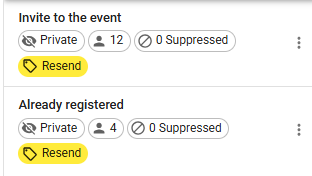
Lets say I'm running an event where I've already sent an invite to a group of contacts. I now want to send a follow up email, however I don't want to send that to the contacts in that group that have already registered.
I have a group with 12 contacts in that the initial invite was sent to. All of the contacts from that group who have registered, I've copied into a new group.
Excluding the group during a send
Now that we have the groups sorted it out, it's time to send the campaign and when I get to the audience screen I'm going to select the group called "Invite to the event".
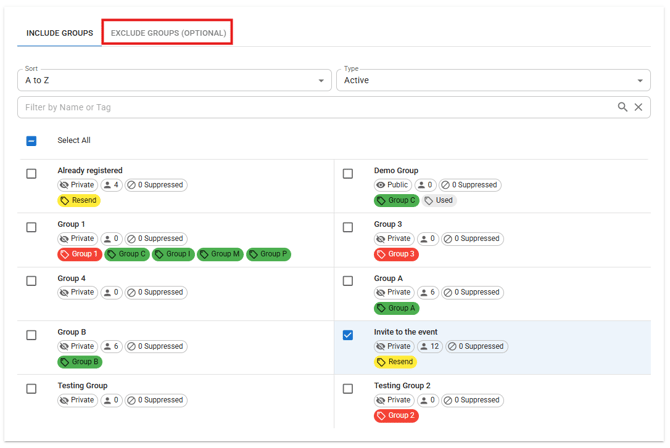
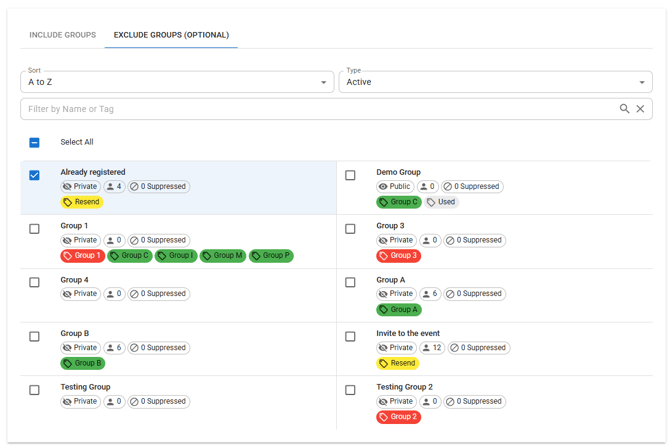
You'll see at the top of the group list there is an option for Exclude Groups. When I click this I see the same list of groups however any I select here will have their contacts excluded from the campaign, so I'm going to select the group called "Already registered".
Audience Summary
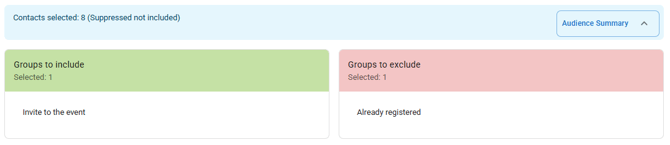
At the top of the list of groups you'll see a blue bar that tells you how many contacts you have selected. You can click where it says Audience Summary to expand this section and see which groups will be included in the email and which will be excluded.
The group I want to include, Invite to the event, has 12 contacts in it and the group I want to exclude, Already registered, has 4 contacts. The blue bar is showing me that 8 contacts are selected which is exactly what I want.
If you have any questions, please reach out to your account manager or email support@newzapp.com