---
title: Why can't I see my Groups or Segments lists
description: When you log into NewZapp and go to the Contacts screen, can you see the list of contacts in a table, but not the list of Groups or Segments on the side? Luckily, this is very easy to resolve!
---
[Skip to content](https://help.newzapp.co.uk/why-cant-i-see-my-groups-or-segments-lists#main-content)
[More support](https://help.newzapp.co.uk/kb-tickets/new?hsLang=en-gb)
[](https://newzapp.co.uk/?utm_source=knowledge%20base&utm_medium=embed&utm_campaign=onsite&utm_content=NZLogo)
Open main navigation
Close main navigation
- [More support](https://help.newzapp.co.uk/kb-tickets/new)
- [Raise A Ticket](https://help.newzapp.co.uk/raise-a-ticket)
[Raise A Ticket](https://help.newzapp.co.uk/raise-a-ticket?hsLang=en-gb)
How can we help you?
- There are no suggestions because the search field is empty.
1. [Help Centre](https://help.newzapp.co.uk/?hsLang=en-gb)
2. [Contact Management](https://help.newzapp.co.uk/contact-management?hsLang=en-gb)
# Why can't I see my Groups or Segments lists
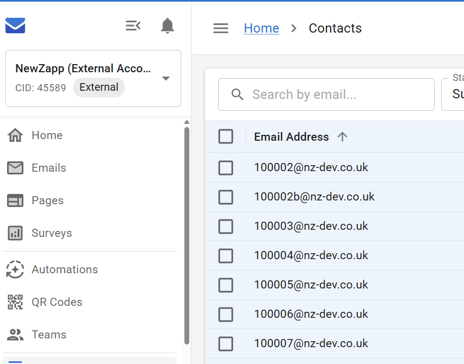
When you log into NewZapp and go to the Contacts screen, can you see the list of contacts in a table, but not the list of Groups or Segments on the side? Luckily, this is very easy to resolve!
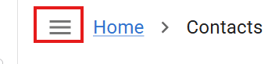
At the top of the screen next to the Home button you'll see an icon of 3 lines.
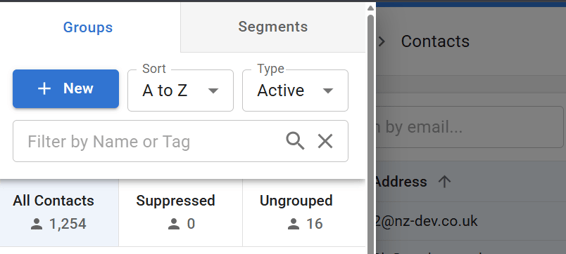
Click this icon and your Groups/Segments list will overlay the top of the screen.
The reason you're not seeing the Groups list by default (like some of your colleagues might be) is because the screen you're using is on the smaller side, such as on a laptop.
We've stopped this list showing by default so that you can still actually see the Contacts in your account without having that main work area reduced to a ludicrously small percentage of your screen. Its the same reason why, if your screen is small enough, we automatically collapse the left-hand navigation menu to just icons.
- [Creating Content](https://help.newzapp.co.uk/creating-content?hsLang=en-gb#main-content)
- [Email](https://help.newzapp.co.uk/creating-content?hsLang=en-gb#email)
- [Branding](https://help.newzapp.co.uk/creating-content?hsLang=en-gb#branding)
- [Landing Pages](https://help.newzapp.co.uk/creating-content?hsLang=en-gb#landing-pages)
- [Surveys & Forms](https://help.newzapp.co.uk/surveys-forms?hsLang=en-gb)
- [Contact Management](https://help.newzapp.co.uk/contact-management?hsLang=en-gb)
- [Reports](https://help.newzapp.co.uk/reports?hsLang=en-gb)
- [Integrations](https://help.newzapp.co.uk/integrations?hsLang=en-gb)
- [Settings & FAQ's](https://help.newzapp.co.uk/settings-faqs?hsLang=en-gb#main-content)
- [Settings](https://help.newzapp.co.uk/settings-faqs?hsLang=en-gb#settings)
- [FAQ's](https://help.newzapp.co.uk/settings-faqs?hsLang=en-gb#faqs)
- [Training Videos](https://help.newzapp.co.uk/training-videos?hsLang=en-gb)
[](https://newzapp.co.uk)
Bradley House, Park Five Business Centre
Exeter
Devon. EX2 7HU
[mailto:support@newzapp.com](mailto:support@newzapp.com)
Copyright © 2024,