---
title: Editor Version History
description: With version history in the email editor you can now revert your email draft back to a former version.
---
[Skip to content](https://help.newzapp.co.uk/version-history#main-content)
[More support](https://help.newzapp.co.uk/kb-tickets/new?hsLang=en-gb)
[](https://newzapp.co.uk/?utm_source=knowledge%20base&utm_medium=embed&utm_campaign=onsite&utm_content=NZLogo)
Open main navigation
Close main navigation
- [More support](https://help.newzapp.co.uk/kb-tickets/new)
- [Raise A Ticket](https://help.newzapp.co.uk/raise-a-ticket)
[Raise A Ticket](https://help.newzapp.co.uk/raise-a-ticket?hsLang=en-gb)
How can we help you?
- There are no suggestions because the search field is empty.
1. [Help Centre](https://help.newzapp.co.uk/?hsLang=en-gb)
2. [Creating Content](https://help.newzapp.co.uk/creating-content?hsLang=en-gb)
# Editor Version History
Every now and then it's time to experiment. Maybe you've been using the same template for a while and you want to change things up a bit, so you spend a little while building a new email.
However maybe after a little while you realise that you prefer an earlier version that what you have now? Do you have to spend ages clicking the undo button at the top? What if you'd clicked out of the email and the undo button isn't active any more? Not to worry, NewZapp now has a Version History button!
At the top of the screen between the undo and redo buttons you'll an icon of a clock in an arrow.

When you click this button, the banners in the editor will be replaced by a new one on the left hand side. Each block will be for a separate session editing the email. each block will show the details of the most recent change, the name of the user who was editing the email at the time and a drop down box of the rest of the changes made in that editing session.
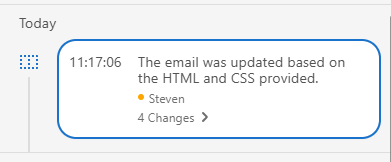
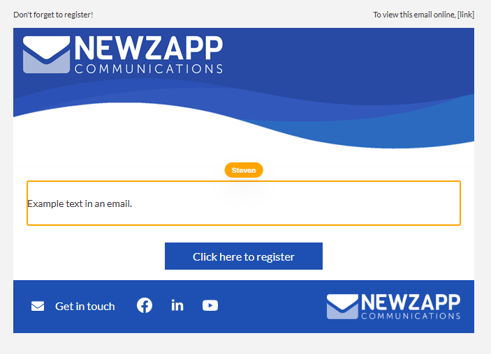
When you click one of those boxes It'll highlight the section of your email that was changed.
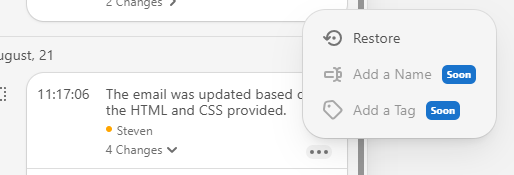
If you want to restore back to the change simply click the 3 dots in that block and select Restore. You will also see options for "Add a Name" and "Add a Tag" which will be added soon.
If you have any questions, please reach out to your account manager or you can email support@newzapp.com
- [Creating Content](https://help.newzapp.co.uk/creating-content?hsLang=en-gb#main-content)
- [Email](https://help.newzapp.co.uk/creating-content?hsLang=en-gb#email)
- [Branding](https://help.newzapp.co.uk/creating-content?hsLang=en-gb#branding)
- [Landing Pages](https://help.newzapp.co.uk/creating-content?hsLang=en-gb#landing-pages)
- [Surveys & Forms](https://help.newzapp.co.uk/surveys-forms?hsLang=en-gb)
- [Contact Management](https://help.newzapp.co.uk/contact-management?hsLang=en-gb)
- [Reports](https://help.newzapp.co.uk/reports?hsLang=en-gb)
- [Integrations](https://help.newzapp.co.uk/integrations?hsLang=en-gb)
- [Settings & FAQ's](https://help.newzapp.co.uk/settings-faqs?hsLang=en-gb#main-content)
- [Settings](https://help.newzapp.co.uk/settings-faqs?hsLang=en-gb#settings)
- [FAQ's](https://help.newzapp.co.uk/settings-faqs?hsLang=en-gb#faqs)
- [Training Videos](https://help.newzapp.co.uk/training-videos?hsLang=en-gb)
[](https://newzapp.co.uk)
Bradley House, Park Five Business Centre
Exeter
Devon. EX2 7HU
[mailto:support@newzapp.com](mailto:support@newzapp.com)
Copyright © 2024,