---
title: Reports - Device
description: Well, with Devices if here are more viewing on a Mobile device, you may want to consider having more 1 Container, Structures. With Videos, Buttons and clear visual clickable content within your email. Whereas for those viewing on a Desktop, you may want to use 2+ Container, Structures within your comms because you have more display on a computer monitor to view content.
---
[Skip to content](https://help.newzapp.co.uk/reports-device#main-content)
[More support](https://help.newzapp.co.uk/kb-tickets/new?hsLang=en-gb)
[](https://newzapp.co.uk/?utm_source=knowledge%20base&utm_medium=embed&utm_campaign=onsite&utm_content=NZLogo)
Open main navigation
Close main navigation
- [More support](https://help.newzapp.co.uk/kb-tickets/new)
- [Raise A Ticket](https://help.newzapp.co.uk/raise-a-ticket)
[Raise A Ticket](https://help.newzapp.co.uk/raise-a-ticket?hsLang=en-gb)
How can we help you?
- There are no suggestions because the search field is empty.
1. [Help Centre](https://help.newzapp.co.uk/?hsLang=en-gb)
2. [Reports](https://help.newzapp.co.uk/reports?hsLang=en-gb)
# Reports - Device
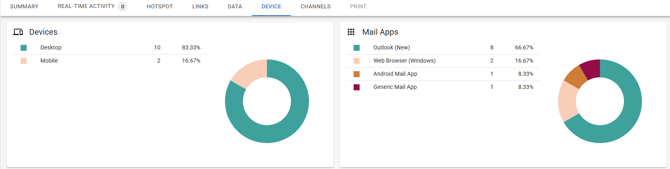
Why is this tab actually really insightful, you may ask?
Well, you might see that you have a high percentage of contacts viewing on a mobile device, so you may want to consider having more 1 Container, Structures. With Videos, Buttons and clear visual clickable content within your email. Whereas for those viewing on a Desktop, you may want to use 2+ Container, Structures within your comms because you have more display on a computer monitor to view content.
Mail Apps. Something that may not appear as insightful, but is actually incredibly helpful and intuitive. By seeing if people are using iPhones compared to Android, you're able to consider resolution and sizing of screens. For example with iPhone X2 all the way to iPhone 11 Pro Max the average screen size was between 5.8 and 6.5 inches. Whereas Android devices vary from 3 to 6 inches. (Data from [https://twinr.dev/blogs/a-complete-guide-to-android-screen-resolutions-and-sizes/#:~:text=The%20size%20of%20an%20Android,necessarily%20mean%20a%20higher%20resolution](https://twinr.dev/blogs/a-complete-guide-to-android-screen-resolutions-and-sizes/#:~:text=The%20size%20of%20an%20Android,necessarily%20mean%20a%20higher%20resolution).)
The 'Device' tab will help to provide insightful data to influence your design choice of templates, layout, style and more.
- [Creating Content](https://help.newzapp.co.uk/creating-content?hsLang=en-gb#main-content)
- [Email](https://help.newzapp.co.uk/creating-content?hsLang=en-gb#email)
- [Branding](https://help.newzapp.co.uk/creating-content?hsLang=en-gb#branding)
- [Landing Pages](https://help.newzapp.co.uk/creating-content?hsLang=en-gb#landing-pages)
- [Surveys & Forms](https://help.newzapp.co.uk/surveys-forms?hsLang=en-gb)
- [Contact Management](https://help.newzapp.co.uk/contact-management?hsLang=en-gb)
- [Reports](https://help.newzapp.co.uk/reports?hsLang=en-gb)
- [Integrations](https://help.newzapp.co.uk/integrations?hsLang=en-gb)
- [Settings & FAQ's](https://help.newzapp.co.uk/settings-faqs?hsLang=en-gb#main-content)
- [Settings](https://help.newzapp.co.uk/settings-faqs?hsLang=en-gb#settings)
- [FAQ's](https://help.newzapp.co.uk/settings-faqs?hsLang=en-gb#faqs)
- [Training Videos](https://help.newzapp.co.uk/training-videos?hsLang=en-gb)
- [General](https://help.newzapp.co.uk/general?hsLang=en-gb)
[](https://newzapp.co.uk)
Bradley House, Park Five Business Centre
Exeter
Devon. EX2 7HU
[mailto:support@newzapp.com](mailto:support@newzapp.com)
Copyright © 2024,