---
title: Public and Private Groups
description: Your NewZapp account has the ability to give contacts the option of managing which emails they receive from you.
---
[Skip to content](https://help.newzapp.co.uk/public-and-private-groups#main-content)
[More support](https://help.newzapp.co.uk/kb-tickets/new?hsLang=en-gb)
[](https://newzapp.co.uk/?utm_source=knowledge%20base&utm_medium=embed&utm_campaign=onsite&utm_content=NZLogo)
Open main navigation
Close main navigation
- [More support](https://help.newzapp.co.uk/kb-tickets/new)
- [Raise A Ticket](https://help.newzapp.co.uk/raise-a-ticket)
[Raise A Ticket](https://help.newzapp.co.uk/raise-a-ticket?hsLang=en-gb)
How can we help you?
- There are no suggestions because the search field is empty.
1. [Help Centre](https://help.newzapp.co.uk/?hsLang=en-gb)
2. [Contact Management](https://help.newzapp.co.uk/contact-management?hsLang=en-gb)
# Public and Private Groups
Your NewZapp account has the ability to give contacts the option of managing which emails they receive from you.
Sending highly targeted email campaigns is a great way to improve response rates. Knowing what your contacts are interested in is a huge step in this process.
Your NewZapp Contacts Section takes care of this for you with Public and Private groups.
**Private Groups**
Private groups are "for your eyes only" only you will be able to see these group names inside your NewZapp account.
They **will not appear** on the Manage Preferences screen that will be presented to your contacts.
**Public Groups**
Public groups **will appear** on the Contacts Preferences screen once they click the link at the bottom of your email. This screen will give them the opportunity to manage what emails they receive from you rather than unsubscribing altogether.
**Setting up your groups**
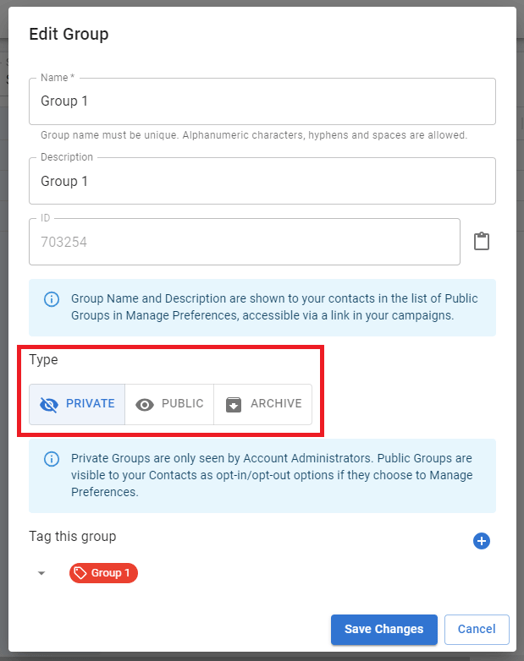
First you need to create the group options for your contacts. When creating a group you'll be asked if it's a **Private or Public Group.** The 4 steps for creating either Group Type is the same.
**Step One**
Choose the group type.
**Step Two**
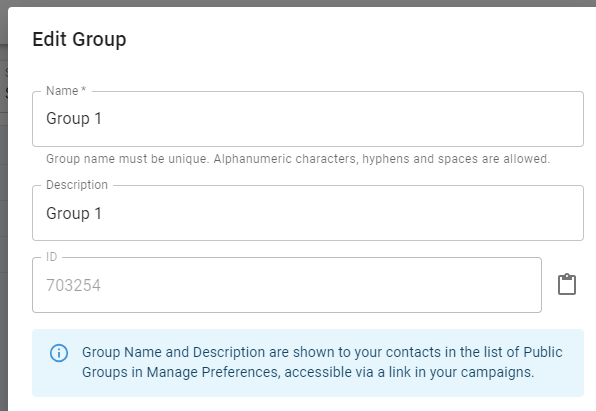
Enter your group name. **IMPORTANT!** If this is a Public group your contacts will see this name, so avoid names like "Lazy Contacts" or "Duff Emails".
**Step Three**
Add a group description. As with **Public Group Name**,avoid descriptions that may cause offence as this will also be visible. It's an ideal opportunity to encourage contacts as to why they should subscribe.
**Step Four**
Click Create Group. From here you can upload contacts to the new group or view the new group.
Once created **Private and Public Groups** are clearly marked inside your NewZapp Contacts Section.
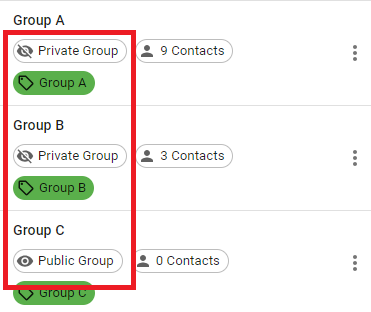
Once created you will have total control over adding and removing contacts from both types of group unless a contact opts in or out of a public group.
- [Creating Content](https://help.newzapp.co.uk/creating-content?hsLang=en-gb#main-content)
- [Email](https://help.newzapp.co.uk/creating-content?hsLang=en-gb#email)
- [Branding](https://help.newzapp.co.uk/creating-content?hsLang=en-gb#branding)
- [Landing Pages](https://help.newzapp.co.uk/creating-content?hsLang=en-gb#landing-pages)
- [Surveys & Forms](https://help.newzapp.co.uk/surveys-forms?hsLang=en-gb)
- [Contact Management](https://help.newzapp.co.uk/contact-management?hsLang=en-gb)
- [Reports](https://help.newzapp.co.uk/reports?hsLang=en-gb)
- [Integrations](https://help.newzapp.co.uk/integrations?hsLang=en-gb)
- [Settings & FAQ's](https://help.newzapp.co.uk/settings-faqs?hsLang=en-gb#main-content)
- [Settings](https://help.newzapp.co.uk/settings-faqs?hsLang=en-gb#settings)
- [FAQ's](https://help.newzapp.co.uk/settings-faqs?hsLang=en-gb#faqs)
- [Training Videos](https://help.newzapp.co.uk/training-videos?hsLang=en-gb)
[](https://newzapp.co.uk)
Bradley House, Park Five Business Centre
Exeter
Devon. EX2 7HU
[mailto:support@newzapp.com](mailto:support@newzapp.com)
Copyright © 2024,