---
title: How to create Landing Pages
description: A landing page is a page of information hosted online that you link to from an email campaign. Landing pages are an ideal tool to avoid emails becoming too long and/or as a means to gather engagement statistics, for example which items/topics in your email campaigns do your recipients most want to read about? Very often landing pages are part of a website, but this isn’t a viable option for some organisations.
---
[Skip to content](https://help.newzapp.co.uk/how-to-create-landing-pages#main-content)
[More support](https://help.newzapp.co.uk/kb-tickets/new?hsLang=en-gb)
[](https://newzapp.co.uk/?utm_source=knowledge%20base&utm_medium=embed&utm_campaign=onsite&utm_content=NZLogo)
Open main navigation
Close main navigation
- [More support](https://help.newzapp.co.uk/kb-tickets/new)
- [Raise A Ticket](https://help.newzapp.co.uk/raise-a-ticket)
[Raise A Ticket](https://help.newzapp.co.uk/raise-a-ticket?hsLang=en-gb)
How can we help you?
- There are no suggestions because the search field is empty.
1. [Help Centre](https://help.newzapp.co.uk/?hsLang=en-gb)
2. [Create and Send](https://help.newzapp.co.uk/create-and-send?hsLang=en-gb)
# How to create Landing Pages
A landing page is a page of information hosted online that you link to from an email campaign. Landing pages are an ideal tool to avoid emails becoming too long and/or as a means to gather engagement statistics, for example which items/topics in your email campaigns do your recipients most want to read about? Very often landing pages are part of a website, but this isn’t a viable option for some organisations.
All NewZapp customers have the tools to create landing pages for their email campaigns, but a landing page template is required with appropriate branding. Please contact us for details on the creation of a bespoke landing page template for your account.
### **Method for creating Landing Pages to use with your communication campaign**
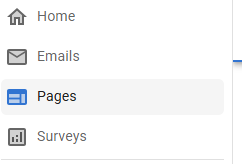
- Select Pages from the list on the left hand side of the screen.
- Select "New Page" in the top corner, then From Template
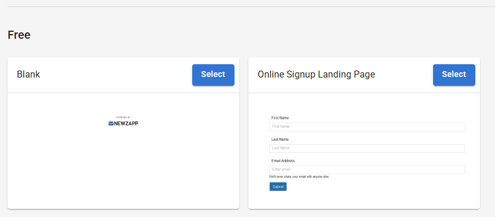
- Select your custom template if available, otherwise there are a couple of generic landing page templates you can use.
- Edit your landing page to meet your requirements. The builder is very similar to the email editor, however while an email is restricted to 1200 pixels wide, this is not the case here.
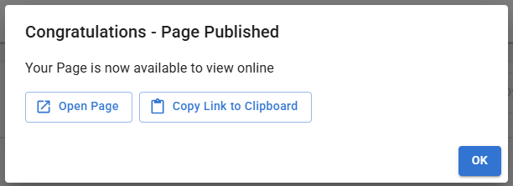
- Once your landing page is finished click Next and go through the publishing wizard.
- You can copy this link once complete.
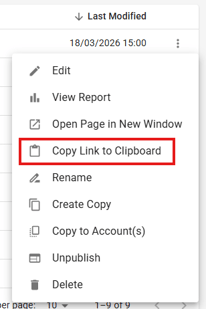
- You will also always have access to this link from the Landing Page list when clicking the 3 dot menu on the right hand side.
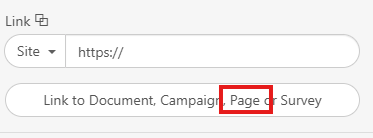
- You can add your Landing Page to your email links by selecting insert link and clicking here:
### **Edit and Republish**
Noticed a mistake on the Landing Page? Or has the information become outdated? No problem!
You can edit the content and republish your Landing Page! The URL will remain the same!
Under the same 3 dot menu from the Page list, there's a button for "Unpublish". This will put the Page back into a draft status for you to make whichever changes you need to.
- [Create and Send](https://help.newzapp.co.uk/create-and-send?hsLang=en-gb)
- [Surveys & Forms](https://help.newzapp.co.uk/surveys-forms?hsLang=en-gb)
- [Contacts](https://help.newzapp.co.uk/contacts?hsLang=en-gb)
- [Reports](https://help.newzapp.co.uk/reports?hsLang=en-gb)
- [Settings](https://help.newzapp.co.uk/settings?hsLang=en-gb)
- [Training Videos](https://help.newzapp.co.uk/training-videos?hsLang=en-gb)
- [Integrations](https://help.newzapp.co.uk/integrations?hsLang=en-gb)
- [Other Topics](https://help.newzapp.co.uk/other-topics?hsLang=en-gb)
- [General](https://help.newzapp.co.uk/general?hsLang=en-gb)
[](https://newzapp.co.uk)
Bradley House, Park Five Business Centre
Exeter
Devon. EX2 7HU
[mailto:support@newzapp.com](mailto:support@newzapp.com)
Copyright © 2024,