
If you have a lot of different types of emails that you send out from your account it can be useful to add Topics to them in your email list. This means at a glance you can tell which email is which and you're also able to filter by topic both here and in Reports.
Adding your first Topic
To add your first topic, click on the cog icon at the top of your email list and click Manage Topics.
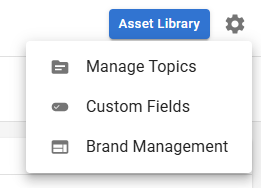
In here click the Add Topic button and on the window that opens up enter a name for your topic and a description too if you'd like though this isn't nececssary. We also recommend assigning a colour to your topic, either by selecting an option from the drop down box or by manually entering a hex code.
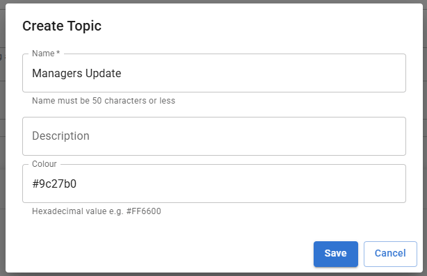
When you're done click save.
Assigning Topics in the email list
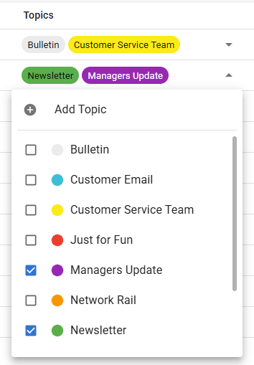
In your email list you'll see an arrow on each row and clicking this opens up a drop down box from which you can add multiple topics and you'll have an option to Add Topic from here as well.
Assigning Topics during when sending an email
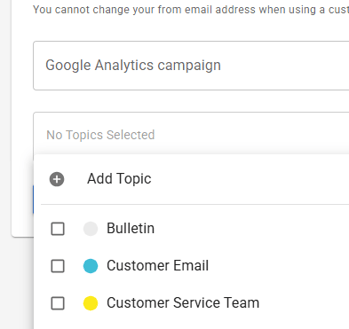
You are also able to assign topics to an email while going through the sending process. In step 2, where you set the Subject Line and From email address, the option at the bottom is for topics where you can assign any topics you have already or create new ones.
Filtering by Topic in your reports
One of the best features of NewZapp's reporting is the Insights screen that allows you see data over a period of time, rather than each email individually. However what if you don't want to see all of the emails over the selected period of time and only want to check on one type of email?
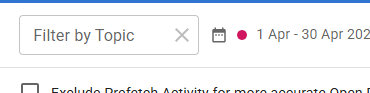
In the top right corner of the screen, next to where you select the date range, there is a Filter by Topic box and in here you can select any of your topics to just view data on emails that have those topics assigned.
If you have any questions, please email support@newzapp.com or reach out to your account manager.