---
title: How many email credits do I have left?
description: When you send an email through NewZapp it spends email credits that you have on your account. Sending an email to 100 people will spend 100 credits, but is there anyway to see the current balance on your account?
---
[Skip to content](https://help.newzapp.co.uk/how-many-email-credits-do-i-have-left#main-content)
[More support](https://help.newzapp.co.uk/kb-tickets/new?hsLang=en-gb)
[](https://newzapp.co.uk/?utm_source=knowledge%20base&utm_medium=embed&utm_campaign=onsite&utm_content=NZLogo)
Open main navigation
Close main navigation
- [More support](https://help.newzapp.co.uk/kb-tickets/new)
- [Raise A Ticket](https://help.newzapp.co.uk/raise-a-ticket)
[Raise A Ticket](https://help.newzapp.co.uk/raise-a-ticket?hsLang=en-gb)
How can we help you?
- There are no suggestions because the search field is empty.
1. [Help Centre](https://help.newzapp.co.uk/?hsLang=en-gb)
2. [Settings & FAQ's](https://help.newzapp.co.uk/settings-faqs?hsLang=en-gb)
3. [Settings](https://help.newzapp.co.uk/settings-faqs?hsLang=en-gb#settings)
# How many email credits do I have left?
When you send an email through NewZapp, it uses email credits from your account. For example, sending an email to 100 recipients uses 100 credits. This article explains how to check your current credit balance, what to do when credits are running low, and how to set up low-credit notifications.
### **How to see your Credit Balance**
It take just two clicks to see the balance of credits on your account.
1\. Click "Account" towards the bottom of the menu on the left of the screen.
2\. Click Billing
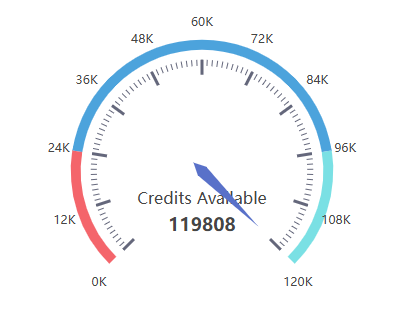
In the screen that opens up you'll see a dial like the one below showing you the balance of credits remaining on your account.
### **What do I do if my credits are running low?**
When your contract renews, credits are automatically topped up. If your renewal date is too far away, contact your account manager to purchase additional email credits in a range of pack sizes to suit your needs.
### **Do I need to check this screen before sending every time to make sure I have enough credits?**
Not at all. In fact you can set a notification in NewZapp to let you know when your email credits go below a certain threshold.
1\. Click Account towards the bottom of the menu on the left.
2\. Click Configuration and in the screen that opens up click Notifications at the top.
On the Notifications screen you will see two fields. In the first field, enter the email address where you would like low-credit notifications to be sent.
Below that, enable the \*\*Low quota notifications\*\* toggle and set your preferred threshold. The default is 1,000 credits, but this can be adjusted to any value.
Once configured, you will receive an email notification whenever a send brings your remaining credits below your chosen threshold. The NewZapp support team will also receive this notification so we can proactively reach out to ensure your account has sufficient credits.
If you have any questions reach out to your account manager or email support@newzapp.com.
- [Creating Content](https://help.newzapp.co.uk/creating-content?hsLang=en-gb#main-content)
- [Email](https://help.newzapp.co.uk/creating-content?hsLang=en-gb#email)
- [Branding](https://help.newzapp.co.uk/creating-content?hsLang=en-gb#branding)
- [Landing Pages](https://help.newzapp.co.uk/creating-content?hsLang=en-gb#landing-pages)
- [Surveys & Forms](https://help.newzapp.co.uk/surveys-forms?hsLang=en-gb)
- [Contact Management](https://help.newzapp.co.uk/contact-management?hsLang=en-gb)
- [Reports](https://help.newzapp.co.uk/reports?hsLang=en-gb)
- [Integrations](https://help.newzapp.co.uk/integrations?hsLang=en-gb)
- [Settings & FAQ's](https://help.newzapp.co.uk/settings-faqs?hsLang=en-gb#main-content)
- [Settings](https://help.newzapp.co.uk/settings-faqs?hsLang=en-gb#settings)
- [FAQ's](https://help.newzapp.co.uk/settings-faqs?hsLang=en-gb#faqs)
- [Training Videos](https://help.newzapp.co.uk/training-videos?hsLang=en-gb)
- [General](https://help.newzapp.co.uk/general?hsLang=en-gb)
[](https://newzapp.co.uk)
Bradley House, Park Five Business Centre
Exeter
Devon. EX2 7HU
[mailto:support@newzapp.com](mailto:support@newzapp.com)
Copyright © 2024,