---
title: Exclude prefetch activity
description: Exclude prefetch activity for more accurate open data
---
[Skip to content](https://help.newzapp.co.uk/exclude-prefetch-activity#main-content)
[More support](https://help.newzapp.co.uk/kb-tickets/new?hsLang=en-gb)
[](https://newzapp.co.uk/?utm_source=knowledge%20base&utm_medium=embed&utm_campaign=onsite&utm_content=NZLogo)
Open main navigation
Close main navigation
- [More support](https://help.newzapp.co.uk/kb-tickets/new)
- [Raise A Ticket](https://help.newzapp.co.uk/raise-a-ticket)
[Raise A Ticket](https://help.newzapp.co.uk/raise-a-ticket?hsLang=en-gb)
How can we help you?
- There are no suggestions because the search field is empty.
1. [Help Centre](https://help.newzapp.co.uk/?hsLang=en-gb)
2. [Reports](https://help.newzapp.co.uk/reports?hsLang=en-gb)
# Exclude prefetch activity
Do you all of a sudden have incredibly high open rate on your emails? As much as I'd like to say that this is down to an excellent email, this could be down to prefetch data, but what is prefetch data and why should it be exluded?
In an attempt to crack down on spam emails being received, companies are activating settings on their mail servers that check every email to make sure they're not malicious. It's an excellent idea to do this, however it can cause misleading data in the reports screen.
A good way to check if this is the case is looking in your Data tab in reports. There's a column for First Opened and if this time is the same or very close for every record, it's probably the security setting checking these emails before they're delivered to the recipients.
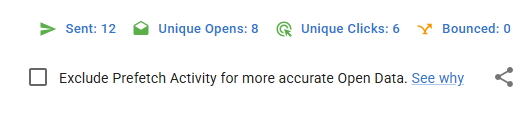
At the top of your screen you'll see a tickbox to Exlude Prefetch Activity. If you tick this NewZapp will do its best to remove the prefetch data from your results.
If you have any questions, please reach out to your account manager or email support@newzapp.com
- [Create and Send](https://help.newzapp.co.uk/create-and-send?hsLang=en-gb)
- [Surveys & Forms](https://help.newzapp.co.uk/surveys-forms?hsLang=en-gb)
- [Contacts](https://help.newzapp.co.uk/contacts?hsLang=en-gb)
- [Reports](https://help.newzapp.co.uk/reports?hsLang=en-gb)
- [Settings](https://help.newzapp.co.uk/settings?hsLang=en-gb)
- [Training Videos](https://help.newzapp.co.uk/training-videos?hsLang=en-gb)
- [Integrations](https://help.newzapp.co.uk/integrations?hsLang=en-gb)
- [Other Topics](https://help.newzapp.co.uk/other-topics?hsLang=en-gb)
- [General](https://help.newzapp.co.uk/general?hsLang=en-gb)
[](https://newzapp.co.uk)
Bradley House, Park Five Business Centre
Exeter
Devon. EX2 7HU
[mailto:support@newzapp.com](mailto:support@newzapp.com)
Copyright © 2024,