---
title: Contact Import Report
description: Once your file has finished importing you will be able to view a summary report of the upload.
---
[Skip to content](https://help.newzapp.co.uk/contact-import-report#main-content)
[More support](https://help.newzapp.co.uk/kb-tickets/new?hsLang=en-gb)
[](https://newzapp.co.uk/?utm_source=knowledge%20base&utm_medium=embed&utm_campaign=onsite&utm_content=NZLogo)
Open main navigation
Close main navigation
- [More support](https://help.newzapp.co.uk/kb-tickets/new)
- [Raise A Ticket](https://help.newzapp.co.uk/raise-a-ticket)
[Raise A Ticket](https://help.newzapp.co.uk/raise-a-ticket?hsLang=en-gb)
How can we help you?
- There are no suggestions because the search field is empty.
1. [Help Centre](https://help.newzapp.co.uk/?hsLang=en-gb)
2. [Contacts](https://help.newzapp.co.uk/contacts?hsLang=en-gb)
# Contact Import Report
Once your contact file has finished importing you will be able to view a summary report of the upload. **Please note** that this information is only available for 1 week.
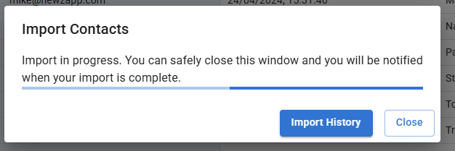
If you select 'Import History' in blue.
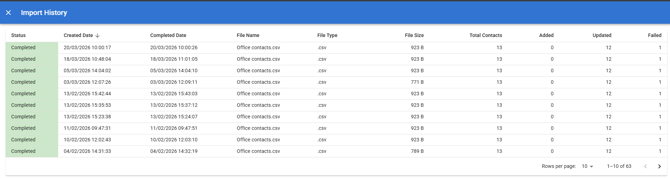
You'll then see the import history above. In my most recent import I tried to import 13 contacts, 12 have updated (meaning the contacts were already in my account) and 1 failed. I'd like to know why that is.
If you click into the Completed import.
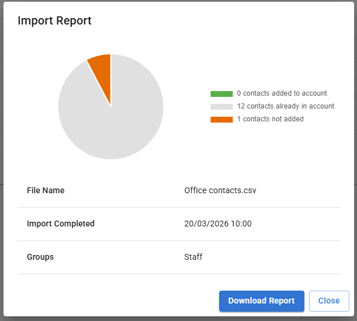
You'll then be presented with the Import Report, which is available for 7 days in line with GDPR.
We can see here that the 12 contacts are already in the account.
If we want to check and see if the updated data has been added to each contact, we could 'Download Report'.
We can then see in Column S that the contacts are already in the account, but has imported the new details.
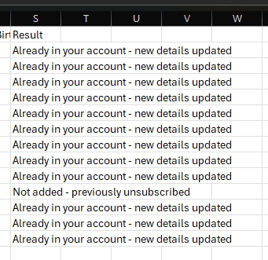
I can see here that contact that failed to be uploaded is a contact that has previously unsubscribed.
- [Create and Send](https://help.newzapp.co.uk/create-and-send?hsLang=en-gb)
- [Surveys & Forms](https://help.newzapp.co.uk/surveys-forms?hsLang=en-gb)
- [Contacts](https://help.newzapp.co.uk/contacts?hsLang=en-gb)
- [Reports](https://help.newzapp.co.uk/reports?hsLang=en-gb)
- [Settings](https://help.newzapp.co.uk/settings?hsLang=en-gb)
- [Training Videos](https://help.newzapp.co.uk/training-videos?hsLang=en-gb)
- [Integrations](https://help.newzapp.co.uk/integrations?hsLang=en-gb)
- [Other Topics](https://help.newzapp.co.uk/other-topics?hsLang=en-gb)
- [General](https://help.newzapp.co.uk/general?hsLang=en-gb)
[](https://newzapp.co.uk)
Bradley House, Park Five Business Centre
Exeter
Devon. EX2 7HU
[mailto:support@newzapp.com](mailto:support@newzapp.com)
Copyright © 2024,