---
title: Collaborative Editing in NewZapp
description: n NewZapp multiple users can access the same email campaign to make changes to it. This is especially helpful to organisations where the newsletters need to be built and sent out as quickly as possible.
---
[Skip to content](https://help.newzapp.co.uk/collaborative-editing-in-newzapp#main-content)
[More support](https://help.newzapp.co.uk/kb-tickets/new?hsLang=en-gb)
[](https://newzapp.co.uk/?utm_source=knowledge%20base&utm_medium=embed&utm_campaign=onsite&utm_content=NZLogo)
Open main navigation
Close main navigation
- [More support](https://help.newzapp.co.uk/kb-tickets/new)
- [Raise A Ticket](https://help.newzapp.co.uk/raise-a-ticket)
[Raise A Ticket](https://help.newzapp.co.uk/raise-a-ticket?hsLang=en-gb)
How can we help you?
- There are no suggestions because the search field is empty.
1. [Help Centre](https://help.newzapp.co.uk/?hsLang=en-gb)
2. [Creating Content](https://help.newzapp.co.uk/creating-content?hsLang=en-gb)
3. [Email](https://help.newzapp.co.uk/creating-content?hsLang=en-gb#email)
# Collaborative Editing in NewZapp
In NewZapp multiple users can access the same email campaign to make changes to it. This is especially helpful to organisations where the newsletters need to be built and sent out as quickly as possible.
### **See who else is editing**
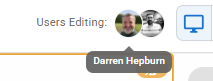
In the email dashboard you can see who is in a draft email currently editing as their initials will show under the Activity column. Once in the email you can also see the draft you can also see who else is editing listed at the top of the screen.
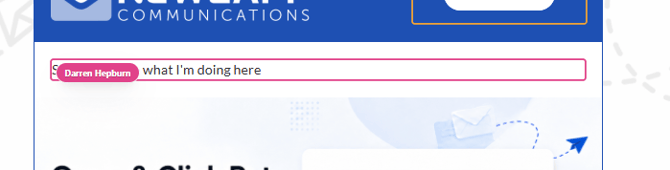
Also, in the editor itself you'll also be able to see what they're actively working on.
### **Leaving comments for each other**
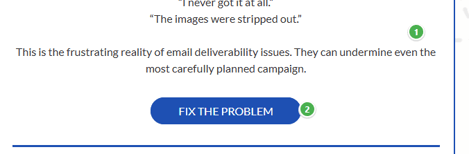
You can now also leave a comment for another editor. If you Alt + Click on a section you can leave a comment, tagging in the other account users. That section will now be marked with a number.
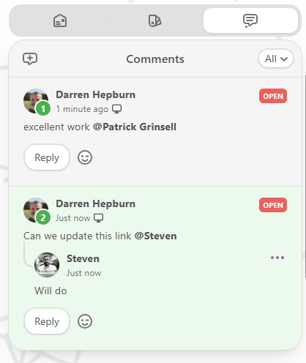
And then in the top right corner of the screen there is a section where you can view the comments and reply to them.
### **Changing editor view**
NewZapp's email editor allows you to construct emails in both Desktop view an Mobile view and you can swap between these views at the top of the screen. The good news here is that when you change the view you're editing in, it doesn't effect the other users editing the same email so they will remain in whichever view they're using.
### **Clicking Undo/Redo**
Mistakes happen. We're all human after all, but if you make a mistake while you're editing the email and another user is editing at the same email. Well if you click the Undo or Redo arrows at the top of the screen they will only effect the changes that you are making, so you don't need to worry about clearing an image that a colleague had just added!
### **What about when sending an email?**
Surely when you're in the process of sending an email, your colleagues can't still be editing it? You're right. The second that you or one of your colleagues clicks the next button at the top of the screen everyone else will be get a message that looks like this.
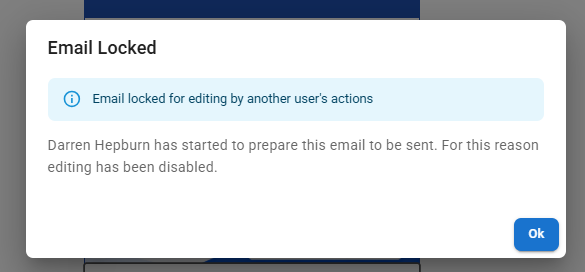
When they click OK they'll be kicked out of the editor and sent back the email dashboard.
If you have any questions, reach out to your account manager or you can email support@newzapp.com
- [Creating Content](https://help.newzapp.co.uk/creating-content?hsLang=en-gb#main-content)
- [Email](https://help.newzapp.co.uk/creating-content?hsLang=en-gb#email)
- [Branding](https://help.newzapp.co.uk/creating-content?hsLang=en-gb#branding)
- [Landing Pages](https://help.newzapp.co.uk/creating-content?hsLang=en-gb#landing-pages)
- [Surveys & Forms](https://help.newzapp.co.uk/surveys-forms?hsLang=en-gb)
- [Contact Management](https://help.newzapp.co.uk/contact-management?hsLang=en-gb)
- [Reports](https://help.newzapp.co.uk/reports?hsLang=en-gb)
- [Integrations](https://help.newzapp.co.uk/integrations?hsLang=en-gb)
- [Settings & FAQ's](https://help.newzapp.co.uk/settings-faqs?hsLang=en-gb#main-content)
- [Settings](https://help.newzapp.co.uk/settings-faqs?hsLang=en-gb#settings)
- [FAQ's](https://help.newzapp.co.uk/settings-faqs?hsLang=en-gb#faqs)
- [Training Videos](https://help.newzapp.co.uk/training-videos?hsLang=en-gb)
[](https://newzapp.co.uk)
Bradley House, Park Five Business Centre
Exeter
Devon. EX2 7HU
[mailto:support@newzapp.com](mailto:support@newzapp.com)
Copyright © 2024,